Every Budgeta feature, explained clearly
23 features, one app
From daily tracking to analytics, backup, and assets — simple by default, flexible when you need more.
Most used
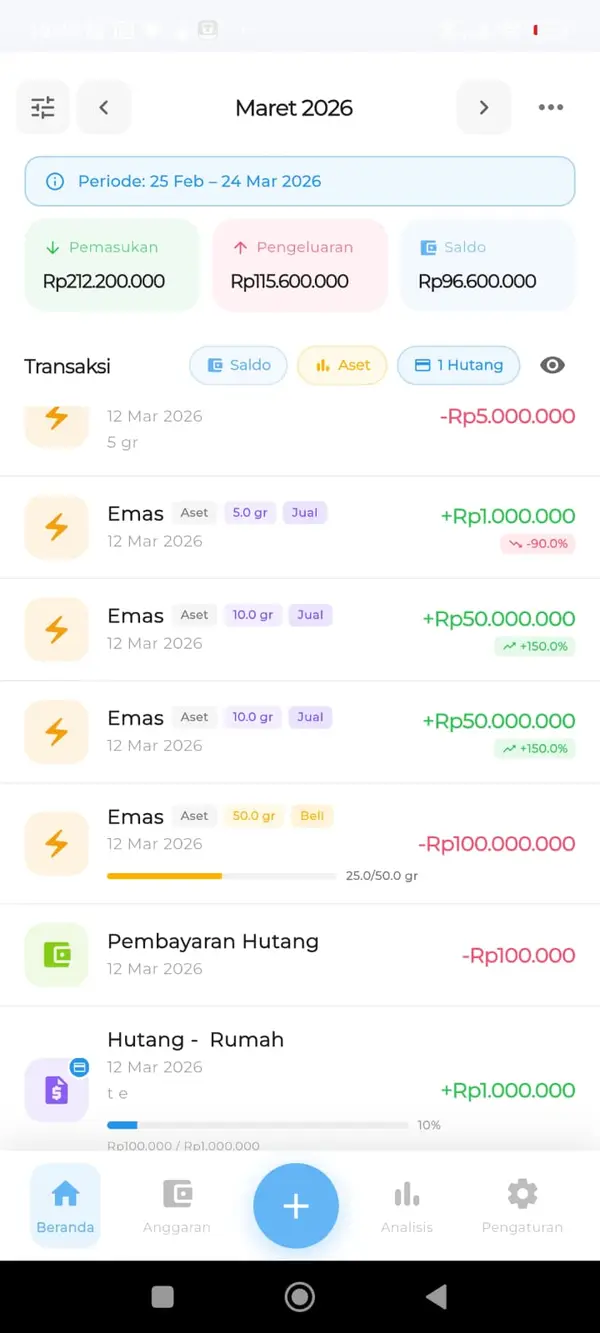
- Home — Complete transaction listing with income, expenses, and balance. Includes filters for quick search.
- Balance & Net Worth — See your net worth in real-time — a single number combining income, expenses, asset values, and debts.
- Financial Health — Check financial health score, income vs expense summary, and AI suggestions for your financial condition.
- Add Transaction — Record transactions by typing manually, using your voice, or scanning a receipt — flexible for any situation.
- Financial Goals — Track goals like a house, car, and more — monitor savings progress until you hit the target.
- Budgeta Affiliate — Share with friends and family or create relevant content. Earn commission for every new customer.
- Chat Assistant — Ask about your finances or get personal analysis — like having your own finance assistant.
Feature catalog
Search a feature, then tap to preview.
Tracking
- Home — Complete transaction listing with income, expenses, and balance. Includes filters for quick search.
- Add Transaction — Record transactions by typing manually, using your voice, or scanning a receipt — flexible for any situation.
- Budget — Set budgets per category. Monitor usage percentage and remaining budget in real-time.
- Emergency Fund — Track your emergency fund specifically so your safety net is ready when you need it.
- Wallets — Set up wallets the way you like — cash, bank accounts, e-wallets, and more in one place.
- Upload E-Statement — Upload bank statements to speed up transaction recording from account mutations.
- Scan Receipts — Scan shopping receipts so expense tracking is faster and more accurate.
Analytics
- Balance & Net Worth — See your net worth in real-time — a single number combining income, expenses, asset values, and debts.
- Financial Reports — Export monthly or annual financial reports in PDF & Excel format — ready to print anytime.
- Financial Health — Check financial health score, income vs expense summary, and AI suggestions for your financial condition.
- Analysis — Analyze expenses with 6-month bar charts, category distribution, and smart insights.
- Financial Goals — Track goals like a house, car, and more — monitor savings progress until you hit the target.
- Chat Assistant — Ask about your finances or get personal analysis — like having your own finance assistant.
Security
- PIN Security — Protect your financial data with a PIN. Every time you open the app, PIN confirmation is required to keep your privacy safe.
Assets
- Asset Monitoring — Track the value of gold, land, houses & apartments in real-time with up-to-date market price estimates.
- Debts & Receivables — Record debts and receivables with dedicated categories, track due dates, and log every payment made.
System
- Collaboration — Share financial data between devices via QR Code. Perfect for families — data from multiple users can be analyzed together.
- Backup & Restore — Automatically encrypted backup to Google Drive every day — your data stays safe, restore with a single tap.
- Custom Period — Adjust the transaction period to match your payday. For example, if payday is the 25th, data is calculated from the 25th of last month to the 24th of this month.
- Import Data — Migrate data from other apps or old spreadsheets using an easy-to-fill Excel template.
- Subcategories — Add subcategories for more detailed tracking. Turn this on or off anytime in settings.
- Budgeta Affiliate — Share with friends and family or create relevant content. Earn commission for every new customer.
- Finance Books — Split money across books such as personal and business, then move funds between books easily.
Ready to try Budgeta?
Free on Google Play. Track, budget, and analyze your personal finances in one place.
Back to home · Blog · FAQ